
Overview
- What it can do
- What it can't do
- Expiry duration
- The learner experience
- Expiry notifications
- What happens to records on renewal
1. What It Can Do
- Apply to any course or learning plan
- Set expiry in days, weeks, months, or years
- Notify learners when a certification is issued or is expiring, with a direct Renew Now link
- Archive past enrolment records - records are saved and can be reported on
2. What It Can't Do
-
- Auto-renew when a learner completion approaches expiry — notification is sent reminding them with Renew Now link included
-
- Reset training material progress in one course without affecting other courses that share the same materials
- Reset LPs without affecting courses that are not in
3. Expiry Duration
Expiry duration is how long a completion stays current before retraining is required. Options are days, weeks, months, or years.
4. The Learner Experience
Learners track their certifications under My Achievements → Certifications — showing what they hold, when it was issued, and when it expires.
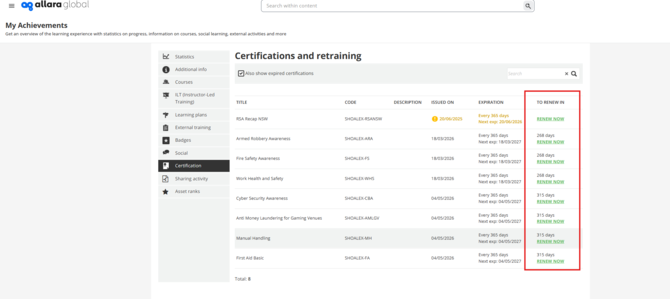
When a certification is expiring or has expired, a Renew Now button appears as shown above. It shows in three places:
- The notification email sent at the time of expiration
- The Certifications tab in My Achievements
- The relevant course or learning plan page
Learners must use 'Renew Now' to trigger recertification.
5. Expiry Notifications
-
- Certification Expired — sent when a certification expires, and can be configured to fire a set number of days or weeks before expiry so learners have time to act.
- The notification can only be sent once before and once after the expiration expires and can not be set up a as a repetitive reminder.
The expiry notification includes a direct Renew Now link that takes them to the My Achievement page.
6. What Happens to Records on Renewal
|
Record |
What happens |
|
Existing enrolment |
Archived — not deleted |
|
New enrolment |
Created — learner starts fresh |
|
Training material progress |
Reset — must be completed again |
|
New certification |
Issued on recompletion with updated expiry date |
|
Historical data |
Retained and visible in reporting |